San José Student Library Card

San José Student Library Card

School District Partnerships with SJPL

San José Public Library is collaborating with San Jose School Districts to support students' academic and career achievement goals by providing a student library card.

With this student card, you can access electronic resources and check out up to five items with no late fees.

What the Card Does For You:

Usage Policies:

  • Parents or family members may not use the San José Student Library Card to check out materials for their own use.
  • Parents who wish to opt out of the San José Student Library Card should contact their school.
  • The San José Student Library Card will expire when the student graduates or leaves the district.

Template Letter to Parent

Contact - General Inquiries

Elizabeth Barragan
Elizabeth.barragan@sjlibrary.org
studentcard@sjlibrary.org

Participating Schools: How to Access Your Account

Alum Rock Union School District

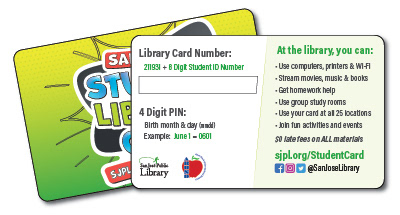
  1. Login with your library card number.

    Use '211931' + your 8-digit Student ID Number.

    Student Library Card, front and back, for Alum Rock Union School District.
  2. Enter your 4-digit PIN.

    Use your birth month and day (mmdd).
    Example: June 1 = 0601

Current Active Years can be found in our FAQs.


Alpha Public Schools

  1. Login with your library card number.

    Use '21195' + [an amount of zeros*] + your Student ID Number.
    * Enter however many zeros are needed to reach a total of 14 digits for the library card number.
    Example: if your Student ID Number is '123456', then your library card number = '21195000123456'.
  2. Enter your 4-digit PIN.

    Use your birth month and day (mmdd).
    Example: June 1 = 0601

Current Active Years can be found in our FAQs.

Bellarmine College Prep

  1. Login with your library card number.

    Use '21194700' + your Student ID Number.
  2. Enter your 6-digit PIN.

    Juniors and Seniors: Please use your 4-Digit Date of Birth.

    Sophomore and Freshmen: Please use your 6-Digit PIN

Current Active Years can be found in our FAQs.

Berryessa Union School District

  1. Login with your library card number.

    Use '211943' + your Student ID Number.
  2. Enter your 4-digit PIN.

    Use your birth month and day (mmdd).
    Example: June 1 = 0601

Current Active Years can be found in our FAQs.

Cambrian School District

  1. Login with your library card number.

    Use '21193600' + your 6-digit Student ID Number.
  2. Enter your 4-digit PIN

    Use your birth month and day (mmdd).
    Example: June 1 = 0601

Current Active Years can be found in our FAQs.

Campbell Union High School District

  1. Login with your library card number.

    Use '21194600' + your Student ID Number.
  2. Enter your 4-digit PIN.

    Use your birth month and day (mmdd).
    Example: June 1 = 0601

Current Active Years can be found in our FAQs.

Discovery Charter Schools

  1. Login with your library card number.

    Use '211933' + [3 or 4 zeros*] + your Student ID Number.
    * Enter however many zeros are needed to reach a total of 14 digits for the library card number.
    Example: if your Student ID Number is '12345', then your library card number = '21193300012345'.
  2. Enter your 4-digit PIN

    Use your birth month and day (mmdd).
    Example: June 1 = 0601

Current Active Years can be found in our FAQs.

Downtown College Prep

  1. Login with your library card number.

    Use '211939' + [an amount of zeros*] + your Student ID Number.
    * Enter however many zeros are needed to reach a total of 14 digits for the library card number.
    Example: if your Student ID Number is '12345', then your library card number = '21193900012345'.
  2. Enter your 4-digit PIN

    Use your birth month and day (mmdd)
    Example: June 1 = 0601

Current Active Years can be found in our FAQs.

Evergreen School District

  1. Login with your library card number.

    Use '21194400' + your Student ID Number.
  2. Enter your 4-digit PIN.

    Use your birth month and day (mmdd).
    Example: June 1 = 0601

Current Active Years can be found in our FAQs.

Franklin-McKinley School District

  1. Login with your library card number.

    Use '211937' + your 8-digit Student ID Number.
  2. Enter your 4-digit PIN.

    Use your birth month and day (mmdd).
    Example: June 1 = 0601

Current Active Years can be found in our FAQs.

Hillbrook Upper Middle School

  1. Login with your library card number.

    Use '211941' + your Student ID Number.

    1. Example: 21194100000[StudentID]
  1. 2. Enter your 4-digit PIN.

  2. Use your birth month and day (mmdd).
    Example: June 1 = 0601

Current Active Years can be found in our FAQs.

Luther Burbank School District

    1. Login with your library card number.

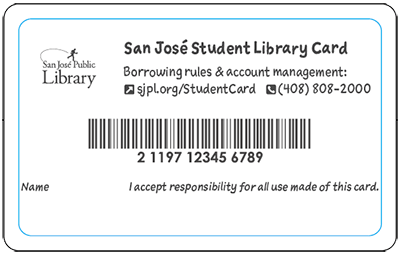
      Use the 14-digit library card number on the back of the card:
      back of the San Jose Student Library Card showing 14-digit barcode
    2. Enter your 4-digit PIN.

      Use your birth month and day (mmdd).
      Example: June 1 = 0601

Current Active Years can be found in our FAQs.

Moreland School District

    1. Use the 14-digit library card number on the back of the card:
      back of the San Jose Student Library Card showing 14-digit barcode
    2. Enter your 4-digit PIN.

      Use your birth month and day (mmdd).
      Example: June 1 = 0601

Current Active Years can be found in our FAQs.

Mt. Pleasant Elementary School District

  1. Login with your library card number.

    Use '211945000' + your Student ID Number.
  2. Enter your 4-digit PIN.

    Use your birth month and day (mmdd).
    Example: June 1 = 0601

Current Active Years can be found in our FAQs.

Notre Dame High School

  1. Login with your library card number.

    Use '211942000' + your 5-digit Student ID Number.
  2. Enter your 4-digit PIN.

    Use your birth month and day (mmdd).
    Example: June 1 = 0601

Current Active Years can be found in our FAQs.

Oak Grove School District

  1. Login with your library card number.

    Use '211938' + your 8-digit Student ID Number.
  2. Enter your 4-digit PIN.

    Use your birth month and day (mmdd).
    Example: June 1 = 0601

*At this time, SJPL does not have new Student Data for this school.

Current Active Years can be found in our FAQs.

Orchard School District

  1. Login with your library card number.

    • Use '211951000' + your Student ID Number.
  2. Enter your 4-digit PIN.

    Use your birth month and day (mmdd).
    Example: June 1 = 0601

Current Active Years can be found in our FAQs.

Presentation High Schools

  1. Login with your library card number.

    Use '2119480' + your 9-digit Student ID Number
  2. Enter your 4-digit PIN

    Use your birth month and day (mmdd).
    Example: June 1 = 0601

Current Active Years can be found in our FAQs.

Rocketship Public Schools

  1. Login with your library card number.

    Use '21194' + your 9-digit Student ID Number
  2. Enter your 4-digit PIN

    Use your birth month and day (mmdd).
    Example: June 1 = 0601

*At this time, SJPL does not have new Student Data for this school.

Current Active Years can be found in our FAQs.

San Jose Unified

  1. Login with your library card number.

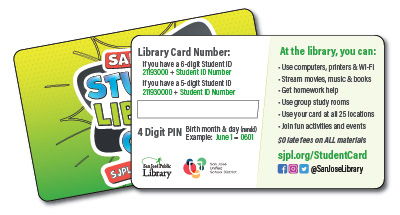
    • If you have a 6-digit Student ID Number, use '21193' + '000' + your Student ID Number.
    • If you have a 5-digit Student ID Number, use '21193' + '0000' + your Student ID Number.
    Student Library Card, front and back, for San Jose Unified
  2. Enter your 4-digit PIN.

    Use your birth month and day (mmdd).
    Example: June 1 = 0601

Current Active Years can be found in our FAQs.

Sunrise Middle School

  1. Login with your library card number.

    • Use '2119321000' + your 4-digit Student ID Number.
  2. Enter your 4-digit PIN.

    Use your birth month and day (mmdd).
    Example: June 1 = 0601

*At this time, SJPL does not have new Student Data for this school.

Current Active Years can be found in our FAQs.

Union School District

*Please note that all students have been issued new card numbers.*

  1. Login with your library card number.

    Use '211935' + [2 or 3 zeros*] + your Student ID Number.
    * Enter however many zeros are needed to reach a total of 14 digits for the library card number.
    Example: if your Student ID Number is '12345', then your library card number = '21193500012345'.
  2. Enter your 4-digit PIN.

    Use your birth month and day (mmdd).
    Example: June 1 = 0601

Current Active Years can be found in our FAQs.

Voices College-Bound Language Academics

  1. Login with your library card number.

    Use '211935' + [2 or 3 zeros*] + your Student ID Number.
    * Enter however many zeros are needed to reach a total of 14 digits for the library card number. Example: if your Student ID Number is '12345', then your library card number = '21193500012345'.
  2. Enter your 4-digit PIN.

    Use your birth month and day (mmdd).
    Example: June 1 = 0601

Current Active Years can be found in our FAQs.

Frequently Asked Questions

Frequently Asked Questions

  • Only students whose school or district are currently enrolled in the program are eligible.

    If you prefer not to have a card, inform your school-and they can opt you out.

    Related Page: San José Student Library Card

    Edit

    • Accounts are automatically created using school or district data.
    • Your library card number and PIN are provided by San José Public Library. 
    • The Student Library Card is established through a formal partnership between your school or school district and San José Public Library (SJPL). 

    Educators: To join our Student Library Card program, please contact Elizabeth Barragan at elizabeth.barragan@sjlibrary.org or email studentcard@sjlibrary.org.

    Related Page: San José Student Library Card

    Edit

  • Your Card Number can appear in different ways:

    • Your card number appears on the back of the physical card provided by your school.
    • Some schools use a combination of a 211939 prefix + student ID number-check your school's instructions or the participating schools list for details 

    Your PIN is a combination of your birthday month and date: 

    • Your PIN is your birth month and day in MMDD format (e.g., June 1 = 0601) 

    Related Page: San José Student Library Card

    Edit

  • Related Page: San José Student Library Card

    Edit

    • Check out or request up to 5 physical items at once
      • Link+ items are not available  
      • No late fees for overdue items!
    • Access all SJPL e-Resources, including homework help and more.

    Related Page: San José Student Library Card

    Edit

View more about San José Student Library Card

Student Resources

Teacher Resources


Print this page